The Windows command-line only shows a history of 300 lines by default - this can be a nuisance especially if you are working with long list outputs. However, you can easily increase the number of lines that are shown.
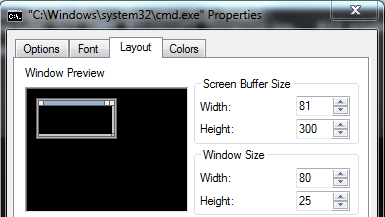
Open a cmd window, right-click the title bar, and select Properties. Go to the Layout tab and under Screen Buffer Size set the Height attribute to the desired value of lines:
The post Increase number of visible lines in cmd on Windows appeared first on FAQforge.